How to Initiate Action Plan - Associated Workflows & Conditions
Introduction
BluMortgage CRM has one workflow rule associated with Initiating Action Plan (Post-Close Drip Campaigns). After the Action Plan is initiated, the CRM will check for the corresponding workflows to send out the automatic email notifications to the closed mortgage records. If you have any questions on how to initiate an Action Plan, please contact us at support@bluroot.ca.
Initiate Action Plan - Workflow Rules
There is one workflow rule in BluMortgage that will initiate the action plan depending on different triggers. The workflow rule "BLU015: Initiate Post-Close Action Plan - External (formerly named: "Blu014_MJ_CloseMortCreateActionPlan")" will create an action plan record when the initiate action plan checkbox has been selected and the mortgage stage is modified to mortgage closed.

Note: Workflow rule "BLU015: Initiate Post-Close Action Plan - External" will simply generate an action plan with the dates when the scheduled emails are meant to go out depending on the term of the mortgage record. This workflow rule does not turn on the email notifications to the borrowers.
The action plan record has 19 workflow rules that will need to be enabled in order to send out the emails during the term of the mortgage. The workflow rules associated with sending out emails once an Action Plan has been created range from "BLU028 - BLU049: Dates 1 - 19". For more information please refer to the Knowledge Based article: BluMortgage Pre-Built Campaigns: Post-Close Drip Campaign
Initiate Action Plan - Conditions
The following conditions need to be met for Action Plan to Initiate:
- Stage IS NOT Mortgage Lost
- Initiate Action Plan Button IS selected
- Maturity Date IS NOT empty
- Closing Date IS NOT empty
- Borrower Name IS NOT empty (borrower must have email address on file for action plans to send out)
Please follow this video for a more detailed explanation of Action Plans and associated workflows that trigger once an action plan has been activated:
Below are the dates that are triggered to send Post Close Emails.
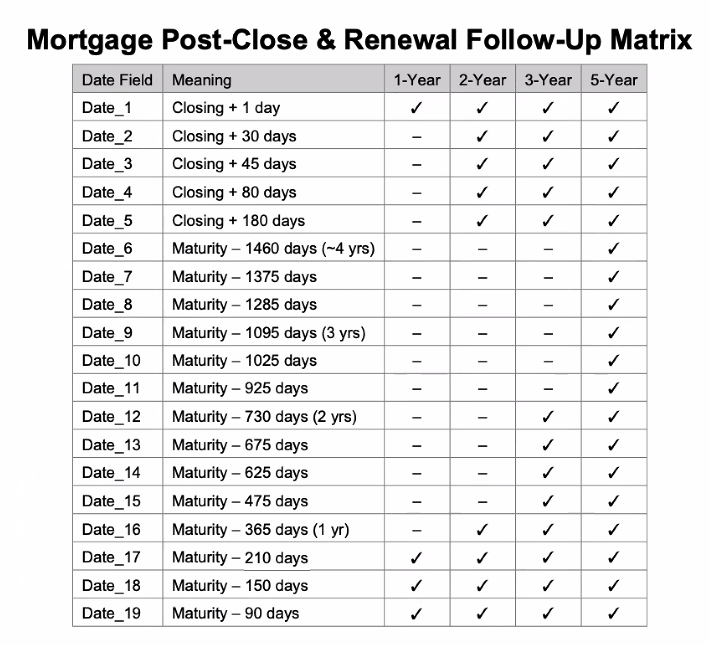

Please do not delete these workflows as they are directly linked to creating Action Plans, you can deactivate these workflows if you do not need them. If you alter a workflow associated with an action plan, please make note of it within the workflow description.
fgfhghfh